Event Ticketing App Development in Lebanon and the GCC: QR Tickets, Check-In, and Payments
 29 Oct
Event Ticketing App Development in Lebanon and the GCC: QR Tickets, Check-In, and Payments
Concerts, festivals, conferences, matches, and university events in Lebanon and the Gulf still often sell tickets through a mix of WhatsApp messages, bank transfers, printed tickets, and spreadsheets at the door. Event ticketing app development means building your own web and mobile platform where guests browse events, pick seats or ticket types, pay online, receive a QR ticket, and get scanned in quickly at the gate, while organizers see sales, attendance, and payouts in one dashboard.
This guide covers when a custom ticketing platform makes sense, the core features, QR check-in and offline scanning, payments and app store rules, handling sales peaks, and a practical build plan for 2026.
Ready-Made Ticketing Platform or Your Own App?
For a single event, an existing ticketing marketplace is usually the fastest option: you list the event, they sell the tickets, and they take a fee per ticket. A custom platform starts to make sense when:
- You run events regularly (a venue, promoter, club, or university) and want to own the customer list and brand experience.
- Your rules don’t fit standard tools: reserved seating for your own venue, group or table bookings, member pricing, season passes, or invitation-only tickets.
- You need integrations: your own payment gateway, accounting or ERP, a CRM, WhatsApp notifications, or a loyalty program.
- You want to sell tickets for others as a marketplace with multiple organizers and payouts.
Our guide to booking system development covers the same buy-or-build trade-off.
Core Features of an Event Ticketing App
- Event pages: date, venue, map, agenda, and entry rules, in Arabic and English.
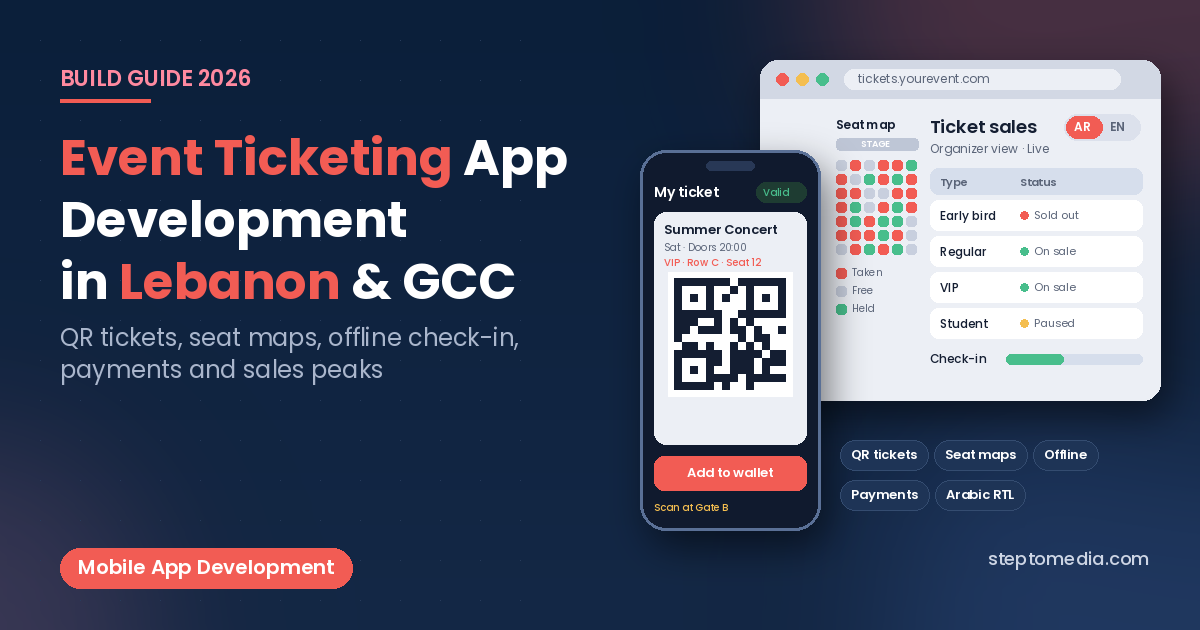
- Ticket types and pricing: early bird, regular, VIP, group, student, and promo codes, with quantity limits per type and per buyer.
- Seat maps: interactive seating for theatres, halls, and stadium sections, with seats held during checkout so two people cannot buy the same seat.
- Digital tickets: a unique QR code per ticket, sent by email or WhatsApp and stored in the app.
- Transfers, refunds, and cancellations: clear rules for transferring a ticket to a friend, refunding, or moving to a new date.
- Organizer dashboard: sales by ticket type, check-in counts, attendee exports, and complimentary tickets.
Version one usually needs event pages, ticket types, payments, QR tickets, and a scanner; seat maps, resale, and marketplace payouts can follow.
QR Tickets and Offline Check-In
The gate is where a ticketing app proves itself. Each ticket should carry a unique, hard-to-guess code, and the scanner app should mark it as used the moment it is scanned so a screenshot of the same ticket cannot get a second person in.
Venues often have weak mobile signal once a crowd arrives, so design the scanner to work offline: download the guest list to each scanning device before doors open, validate tickets locally, and sync check-ins between devices when the connection returns.
Tickets can also be added to Apple Wallet and Google Wallet, both of which support event ticket passes, so guests can open them without launching your app. Test scanning on real devices and venue lighting, as our guide to mobile app testing recommends.
Event Ticketing App Development and Payments
Online card payments, Apple Pay, and local options are central to ticket sales. In Lebanon, gateway choice, settlement currency, and cash-on-collection alternatives need planning; our guide to payment gateways in Lebanon walks through the options, and our API integration guide covers connecting payments, accounting, and WhatsApp.
App store rules matter here too. Apple’s App Store Review Guidelines (3.1.3(e)) say that goods or services consumed outside the app must be paid for with methods other than in-app purchase, such as Apple Pay or card entry, and Google Play’s payments policy lists tickets for live events among the physical services that must not use Google Play’s billing system. Our guide to publishing on the App Store and Google Play covers the review process.
If you sell tickets in Saudi Arabia, your invoices also fall under ZATCA e-invoicing: simplified tax invoices (usually to consumers) must carry a QR code and be reported within 24 hours of being generated. Check current rules before launch.
Handling Sales Peaks and Preventing Abuse
Ticket sales are spiky: a popular event can bring many buyers at once when sales open, so plan for it:
- Inventory locking: reserve tickets or seats during checkout and release them automatically if payment is not completed.
- Waiting room: queue visitors during peak launches instead of letting the site slow down for everyone.
- Purchase limits and bot protection: cap tickets per buyer and add verification to reduce scalping.
These choices affect hosting, so raise them early, and load-test a sales launch before going live. For updates and monitoring after launch, see our guide to website and app maintenance.
Web, Mobile App, or Both?
Many buyers won’t install an app for one ticket, so a fast mobile-friendly website is usually the main sales channel. A mobile app adds value for repeat audiences, such as a venue’s regulars, a club’s season ticket holders, or a festival with schedules and maps, and the staff scanner is usually a separate app. Our comparison of web application vs mobile app explains how to decide, and our guide to Flutter vs React Native covers building iOS and Android together. To reward repeat attendees, see our guide to loyalty app development.
Arabic, Data Protection, and Trust
Audiences in Lebanon and the Gulf often switch between Arabic and English, so plan right-to-left layouts, Arabic event names, and bilingual tickets and emails; our guide to bilingual Arabic and English websites covers the basics. Collect only the personal data you need, secure it, and publish a clear privacy policy. Lebanon’s Law No. 81 of 2018 on electronic transactions and personal data, Saudi Arabia’s Personal Data Protection Law, and the UAE’s Federal Decree-Law No. 45 of 2021 set rules on consent, purpose, and security for personal data. This is general information, not legal advice.
A Practical Build Plan
- Map your events: types, venues, seating, ticket rules, and refund policy.
- Choose payments and integrations: gateway, currencies, accounting, and messaging.
- Build the core: event pages, checkout, QR tickets, and the scanner app.
- Pilot on a smaller event with real gates, staff, and devices, including offline scanning.
- Add seat maps, wallet passes, and payouts once the core works.
What Affects the Cost and Timeline
We don’t quote fixed prices without a scope. The main factors are seat maps, number of ticket types, payment gateways, web only or web plus apps, offline scanning, marketplace payouts, languages, and expected peak traffic. For general budgeting, see our guide to custom software development cost in Lebanon.
How Step To Media Can Help
Step To Media builds websites, mobile apps, and custom software from Mkalles for businesses in Lebanon and the Gulf. Explore our mobile app development, website development, and custom software development services. You can also learn more about us as a software and web development company in Lebanon, or see how we work as a software development agency in Lebanon. Planning a ticketing platform? Contact us with the events you run, how you sell tickets today, and the payment options you need.
Frequently Asked Questions
What is an event ticketing app?
An event ticketing app is a web or mobile platform where guests browse events, choose tickets or seats, pay online, and receive a QR ticket, with a scanner app for entry and a dashboard for organizers.
Should I build a custom ticketing platform or use an existing one?
For occasional events, an existing ticketing platform is usually enough. A custom platform makes more sense if you run events regularly, need your own seating or pricing rules, or want to own customer data and integrations.
Can ticket scanning work without internet?
Yes, if the scanner app is built offline-first. The guest list is downloaded to each device before doors open, tickets are validated locally, and check-ins sync between devices when the connection returns.
Do ticketing apps have to use Apple or Google in-app purchase?
No. Apple’s guidelines require methods other than in-app purchase for services consumed outside the app, and Google Play lists tickets for live events among payments that must not use its billing system, so ticket apps use a regular payment gateway.
Can tickets be added to Apple Wallet or Google Wallet?
Yes. Both Apple Wallet and Google Wallet support event ticket passes, so guests can store and open their tickets without launching your app.
No next post available