Construction Management Software in Lebanon and the GCC: Site Reports, Approvals, and Costs
 5 Nov
Construction Management Software in Lebanon and the GCC: Site Reports, Approvals, and Costs
Contractors in Lebanon and the Gulf often run sites through WhatsApp groups, paper forms, and spreadsheets that are out of date by the time they reach the office. Construction management software brings this into one system: a mobile app for site teams, a web dashboard for project managers, and approval workflows that keep the office, the site, and the client looking at the same information.
This guide covers features, the site app, approvals, costs, GCC site rules, languages, and a 2026 build plan.
Who Uses Construction Management Software
Each role needs a different screen:
- Site engineers and foremen: daily reports, photos, attendance, and requests from the site, often on a phone.
- Project managers: progress, schedules, open issues, and approvals across several projects.
- Procurement and stores: material requests, purchase orders, and deliveries to each site.
- Finance and management: budgets, subcontractor payments, and cost against plan.
- Clients and consultants: a portal to see progress, review submittals, and sign off work.
Core Features of Construction Management Software
- Projects and sites: one record per project with phases, locations, teams, and documents.
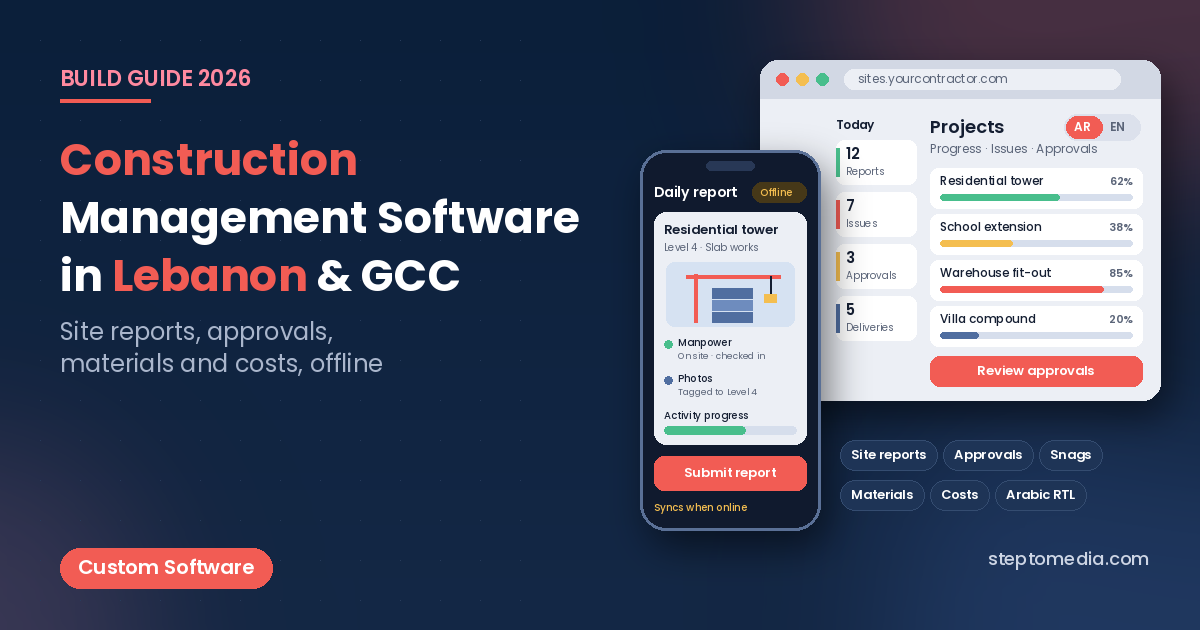
- Daily site reports: work done, manpower, equipment, weather, and photos, submitted from the site.
- Tasks and schedules: activities with planned and actual dates, so delays show up early.
- Issues and snag lists: defects pinned to a location or drawing, with photos, an owner, and a due date.
- Documents and drawings: one place for the latest revision, so crews don’t build from old versions.
- Requests and approvals: material requests, inspection requests, and variations with a clear approval trail.
- Dashboards: progress, open issues, and cost per project for managers.
The Site App: Offline Mode, Photos, and Attendance
The site app decides whether the system gets used, so design it for real site conditions:
- Offline mode: basements, new towers, and remote sites often have weak signal. The app should save reports and photos on the phone and sync when the connection returns. Our guide to field sales app development explains offline sync in more detail.
- Photos with context: each photo tagged with the project, location, date, and time, and linked to a report or an issue.
- Attendance and manpower: crew check-in per site, including subcontractor crews, feeding the daily report.
- Quick forms: inspection checklists, safety observations, and delivery receipts with as few fields as possible.
Most teams need a mobile app for the site and a web app for the office. Our comparison of web app vs mobile app helps you decide what to build first, and our guide to mobile app testing covers testing on the low-cost Android phones many crews use.
Approvals, Variations, and the Client Portal
Build every request as a record with a status, an owner, attachments, and a history: material approvals, inspection requests, requests for information, and variation orders. Managers approve from the phone, and the next person is notified.
A client or consultant portal can show progress photos, approved submittals, and open items without sending reports by email. Our guide to custom internal tools covers approval workflows and dashboards that teams actually use.
Materials, Procurement, and Cost Control
Materials and subcontractors are usually where budgets slip. The system can link each material request to a project and a budget line, track purchase orders and deliveries, and record what reached each site. If you hold stock in a central yard, our guide to warehouse management app development covers stock, transfers, and barcode scanning.
Many contractors already use accounting software or an ERP. Usually the construction system should send approved purchase orders, subcontractor payments, and costs to it, not replace it. Our comparison of ERP vs custom software explains where each fits, and our guide to API integration shows how the systems connect. If you invoice clients in Saudi Arabia or the UAE, check e-invoicing requirements; our field sales guide summarises the current Saudi and UAE e-invoicing rules.
GCC Site Rules That Shape Scheduling
Site software in the Gulf should reflect working-hour rules. Two examples that affect schedules and timesheets:
- UAE: under the Ministry of Human Resources and Emiratisation’s midday break, work under direct sunlight and in open areas is not allowed from 12:30 pm to 3:00 pm between 15 June and 15 September each year, with exemptions for certain technical work such as concrete pouring that cannot be postponed.
- Saudi Arabia: the Ministry of Human Resources and Social Development applies a ban on work under direct sunlight from 12:00 pm to 3:00 pm between 15 June and 15 September for private sector establishments.
In practice, the system can block outdoor tasks during these hours in summer, plan shifts around them, and keep attendance records that show the rules were followed. This is general information, not legal advice; check current requirements in each market before launch.
Arabic, English, and Multilingual Crews
Office staff in Lebanon and the Gulf often work in English, while clients and authorities may need Arabic documents, and site crews may read neither well. Build Arabic and English with proper right-to-left layouts, use icons, photos, and short labels in the site app,. Reports and PDFs should be available in the language the client needs.
Security and Data Protection
A construction system holds drawings, contracts, prices, and worker details such as IDs and attendance. Give each role access only to its projects, keep subcontractors out of internal costs, and log who approved what. Lebanon’s Law No. 81 of 2018 on electronic transactions and personal data, Saudi Arabia’s Personal Data Protection Law, and the UAE’s Federal Decree-Law No. 45 of 2021 set rules for personal data. Check current requirements with a lawyer in each market.
Off-the-Shelf or Custom Construction Software?
Off-the-shelf platforms suit teams whose process fits the product. A custom build makes sense when you need Arabic, offline use on site, your own approval chain, integration with your accounting or ERP, or a client portal in your own brand.
A Practical Build Plan
- Map your process: who reports, who approves, and what the office needs each day. Our custom software brief guide helps you write this down.
- Pick the first module: usually daily reports, photos, and issues, because site teams feel the benefit quickly.
- Build version one: a site app with offline mode, a web dashboard, roles, and approvals.
- Pilot on one project: train the site team, collect feedback, and fix what slows them down.
- Add the next layer: procurement, subcontractor payments, cost control, the client portal, and integrations.
What Affects the Cost and Timeline
We don’t quote fixed prices without a scope. The main factors are the number of modules, offline sync, roles and approval steps, languages, reports, and integrations. For general budgeting, see our guide to custom software development cost in Lebanon. Plan for updates, backups, and support after launch with our guide to website and app maintenance.
How Step To Media Can Help
Step To Media builds custom software, mobile apps, and websites from Mkalles for businesses in Lebanon and the Gulf. Explore our custom software development, mobile app development, and website development services. You can also learn more about us as a software and web development company in Lebanon, or see how we work as a software development agency in Lebanon. Planning construction software? Contact us with your project types, team size, and how your sites report today.
Frequently Asked Questions
What does construction management software do?
It brings projects, daily site reports, photos, tasks, issues, documents, approvals, materials, and costs into one system, with a mobile app for the site and a web dashboard for the office.
Can a construction site app work without internet?
Yes. A well-built site app saves reports, photos, and checklists on the phone and syncs them when the connection returns, which matters in basements and remote sites.
Can the software handle the summer midday break in the UAE and Saudi Arabia?
Yes. It can block outdoor tasks during the midday break hours between 15 June and 15 September, plan shifts around them, and keep attendance records. Check the current rules each year.
Should construction software replace our accounting system or ERP?
Usually not. The construction system handles site work, approvals, and project costs, and sends approved purchase orders, payments, and costs to your existing accounting system or ERP.
Where should a contractor start?
Start with one module that site teams use every day, such as daily reports, photos, and snag lists, pilot it on one project, then add procurement, costs, and a client portal.
No next post available