Custom CRM Development in Lebanon and the GCC: Leads, WhatsApp, and Sales Pipelines
Custom CRM Development in Lebanon and the GCC: Leads, WhatsApp, and Sales Pipelines
 13 Nov
Custom CRM Development in Lebanon and the GCC: Leads, WhatsApp, and Sales Pipelines
Custom CRM development usually starts when a sales team outgrows spreadsheets and chat threads. Leads arrive from website forms, WhatsApp, phone calls, Instagram messages and walk-ins, follow-ups depend on someone’s memory, and managers cannot see which deals are close to closing. This guide explains what a custom CRM is, which features matter for businesses in Lebanon and the GCC, when an off-the-shelf CRM is the better choice, and how to plan a build in phases.
Step To Media is a software development agency in Lebanon that builds websites, mobile apps and custom software for local and Gulf businesses. The notes below are practical scoping advice, not a pitch for one tool.
What Is a Custom CRM?
A CRM (customer relationship management system) is the software that stores your leads, customers, conversations and deals in one place. It answers simple daily questions: who contacted us, who owns this lead, what was promised, and what happens next.
A custom CRM is built around your own sales process instead of a generic template. The pipeline stages, fields, permissions, reports and integrations match how your team actually sells, whether you run a real estate agency, a distributor, a clinic group, a training center or a B2B service company.
Core Features of a Sales CRM
Start with the features that remove daily friction, then add the rest in later phases:
- Lead capture: leads created automatically from website forms, landing pages, WhatsApp and manual entry, with the source recorded for each one.
- Contacts and companies: one record per customer with phone numbers, notes, files, past deals and every interaction.
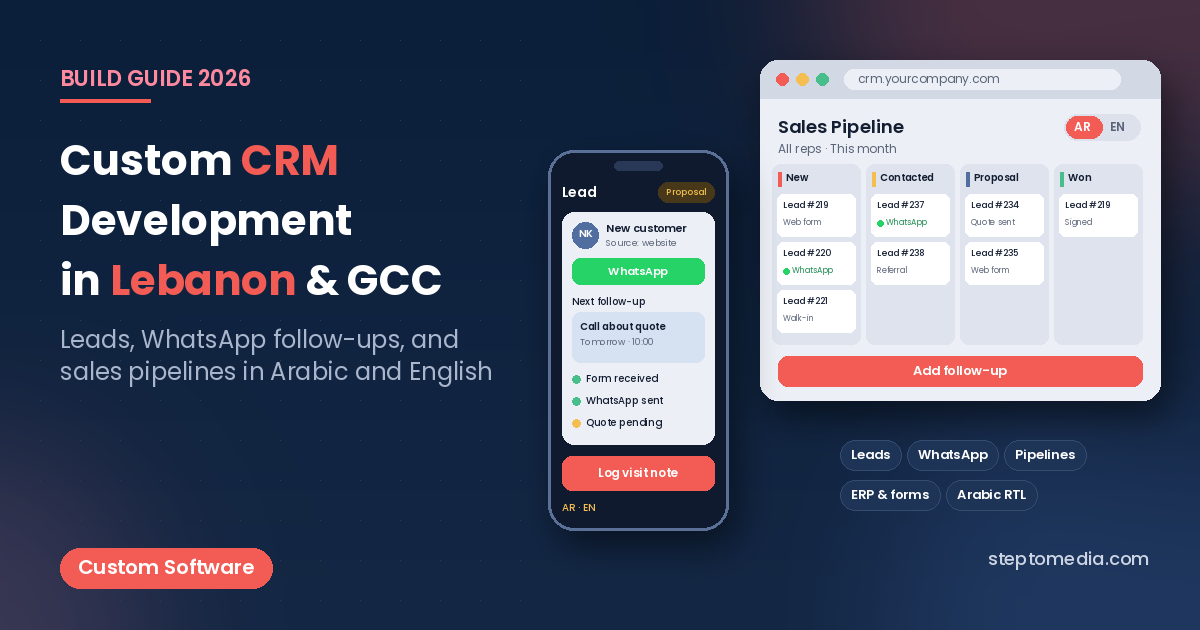
- Sales pipeline: a board with stages such as New, Contacted, Proposal, Negotiation and Won or Lost, where reps drag deals forward.
- Tasks and follow-ups: reminders for calls, meetings and quotes, with overdue alerts so no lead is forgotten.
- Assignment rules: leads routed by branch, product, language or round-robin between reps.
- Quotes: simple quotations generated from the deal, in Arabic or English, with your products and price lists.
- Dashboards: leads by source, conversion by stage, response times and deals per rep, exportable for management.
- Roles and permissions: reps see their own deals, managers see their team, and owners see everything.
WhatsApp and Lead Follow-Ups
In Lebanon and the Gulf, many customers prefer WhatsApp to email. A useful CRM links WhatsApp conversations to the right lead, so a manager can see what was said without asking for screenshots. With the official WhatsApp Business Platform, the CRM can log incoming messages, send approved template messages for reminders or quotes, and assign new chats to a rep.
WhatsApp’s business messaging has its own rules: templates need approval, customers must opt in, and some message types are charged by Meta. Plan these details early. Our guide to WhatsApp and ERP integration covers how messaging connects to back-office systems.
Arabic and English Interfaces
Sales teams in the region often work in both languages. The CRM should support Arabic and English labels, right-to-left layouts that do not break on tables and forms, Arabic search that handles different spellings, and quotes or messages sent in the customer’s preferred language. Our guide to bilingual Arabic and English websites explains RTL details that apply to internal tools as well.
Currency matters too. Businesses in Lebanon often quote in USD, while GCC teams work in local currencies with VAT. Decide how deal values, taxes and exchange rates are stored, so reports stay consistent.
Integration with ERP, Accounting and Website Forms
A CRM becomes more valuable when it is not an island. Common connections include:
- Website forms: contact, quote and booking forms push leads straight into the pipeline, built as part of your website development project or connected to an existing site.
- ERP and accounting: won deals create customers or sales orders in Odoo or your accounting software, and invoice or payment status flows back to the rep.
- Email and calendar: meetings and emails logged against the right contact.
- Ads and analytics: lead source data so you know which campaigns bring real deals.
Our API integration guide for payments, ERP and WhatsApp explains how these connections are planned. If you are still deciding whether your ERP should handle sales at all, read ERP vs custom software in Lebanon.
Mobile Access for Sales Reps
Reps who visit clients need the CRM on their phones: today’s tasks, the customer’s history, a quick call or WhatsApp button, and a way to log a visit note right after the meeting. A responsive web app is often enough for the first phase. A native app through our mobile app development team makes sense when reps need offline access, GPS check-ins, photos or order taking in the field, as described in our field sales app development guide.
Custom CRM vs HubSpot, Zoho or Salesforce
Off-the-shelf CRMs such as HubSpot, Zoho CRM and Salesforce are mature products with large feature sets. For many small teams with a standard sales process, one of them is the right answer: quick to start, well documented and maintained by the vendor.
A custom CRM makes more sense when:
- Your process does not fit standard pipelines, for example property units, multi-step approvals or dealer networks.
- You need deep links to a local ERP, accounting system or in-house database that the platform cannot reach easily.
- Per-user subscription fees grow quickly as the team expands.
- Arabic RTL, local currencies or WhatsApp workflows feel bolted on.
- You want full control of your customer data and where it is hosted.
A middle path also exists: keep a SaaS CRM and build custom integrations or small internal tools around it. Our comparison of custom software vs SaaS walks through the trade-offs.
Custom CRM Development: Cost and Phased Plan
We don’t quote fixed prices without a scope. Cost depends on the number of pipelines and user roles, the depth of WhatsApp and ERP integration, mobile requirements and reporting needs. Our custom software development cost guide for Lebanon explains the main cost drivers.
A sensible phased plan looks like this:
- Phase 1: contacts, lead capture from website forms, one sales pipeline, tasks and follow-up reminders, basic dashboard.
- Phase 2: WhatsApp integration, assignment rules, quotes in Arabic and English, mobile-friendly views for reps.
- Phase 3: ERP and accounting sync, advanced reports, a native mobile app if field work requires it.
Through our custom software development service, each phase is released, used by the team and adjusted before the next one starts.
What to Prepare Before You Start
Before you contact any team, prepare a short brief:
- Your current lead sources and roughly how many leads arrive each month.
- Your sales stages, from first contact to closed deal.
- Who uses the CRM: reps, managers, support, accounting.
- Existing tools: ERP, accounting software, website, WhatsApp numbers.
- A sample of your current spreadsheet or export, with sensitive data removed.
- The reports management wants to see every week.
If you are comparing partners, our page on choosing a software and web development company in Lebanon lists what to check. When you’re ready, contact Step To Media to discuss your sales workflow.
Frequently Asked Questions
What is custom CRM development?
It is building a CRM around your own sales process, with the pipeline stages, fields, permissions, reports and integrations your team needs, instead of adapting your process to a generic platform.
Can a CRM connect to WhatsApp?
Yes. Using the official WhatsApp Business Platform, a CRM can log conversations against leads, assign chats to reps and send approved template messages for reminders and quotes.
Should I choose a custom CRM or HubSpot, Zoho or Salesforce?
If your sales process is standard and your team is small, an off-the-shelf CRM is often enough. A custom CRM fits better when you need deep ERP integration, Arabic-first workflows, unusual pipelines or control over data and per-user costs.
Can the CRM work in Arabic and English?
Yes. A well-built CRM supports both languages in the interface, uses a proper right-to-left layout for Arabic, and can send quotes and messages in each customer’s preferred language.
Can sales reps use the CRM on their phones?
Yes. A responsive web version works on any phone for tasks, notes and customer history. A native app is useful when reps need offline access, GPS check-ins or order taking in the field.
No next post available