Restaurant Ordering System Development in Lebanon and the GCC: QR Menus, Direct Orders, and Kitchen Screens
Restaurant Ordering System Development in Lebanon and the GCC: QR Menus, Direct Orders, and Kitchen Screens
 12 Nov
Restaurant Ordering System Development in Lebanon and the GCC: QR Menus, Direct Orders, and Kitchen Screens
Restaurant ordering system projects usually start with a simple frustration: orders arrive through phone calls, WhatsApp messages, delivery apps and walk-in customers, and nobody has one clear view of what the kitchen needs to cook next. This guide explains what a restaurant ordering system is, which features matter for restaurants, cafés and cloud kitchens in Lebanon and the GCC, how it connects to payments and your POS, and how to plan the build without overspending.
Step To Media is a software development agency in Lebanon that builds websites, mobile apps and custom software for local and Gulf businesses. The notes below are practical scoping advice, not a sales pitch for one platform.
What Is a Restaurant Ordering System?
A restaurant ordering system is the software that takes an order from a customer, sends it to the kitchen, tracks its status and records the payment. It can include an online ordering website, a QR menu for dine-in tables, a mobile app, a kitchen display screen and an admin dashboard for menus, prices and opening hours.
The goal is one source of truth. Whether an order comes from the website, a table QR code or a staff tablet, it should land in the same queue with the same item names, modifiers and notes.
Restaurant Ordering System vs a Delivery App
These two are often confused. A delivery app, like the multi-vendor platforms covered in our on-demand delivery app development guide, connects many stores, customers and couriers, with driver dispatch and live tracking. A restaurant ordering system belongs to one restaurant or one group. It focuses on your own menu, your own customers, your kitchen workflow and direct orders that you control.
Many restaurants keep listing on delivery marketplaces for reach, and add their own ordering channel for repeat customers who already know the brand. The two can live side by side.
Core Features of a Restaurant Ordering System
Start with the features that remove daily friction, then add the rest in later phases:
- Menu management: categories, items, photos, sizes, add-ons, combos, allergens and “sold out” toggles that staff can change in seconds.
- Online ordering website: pickup and delivery orders from your own domain, with delivery zones, minimum order values and scheduled orders.
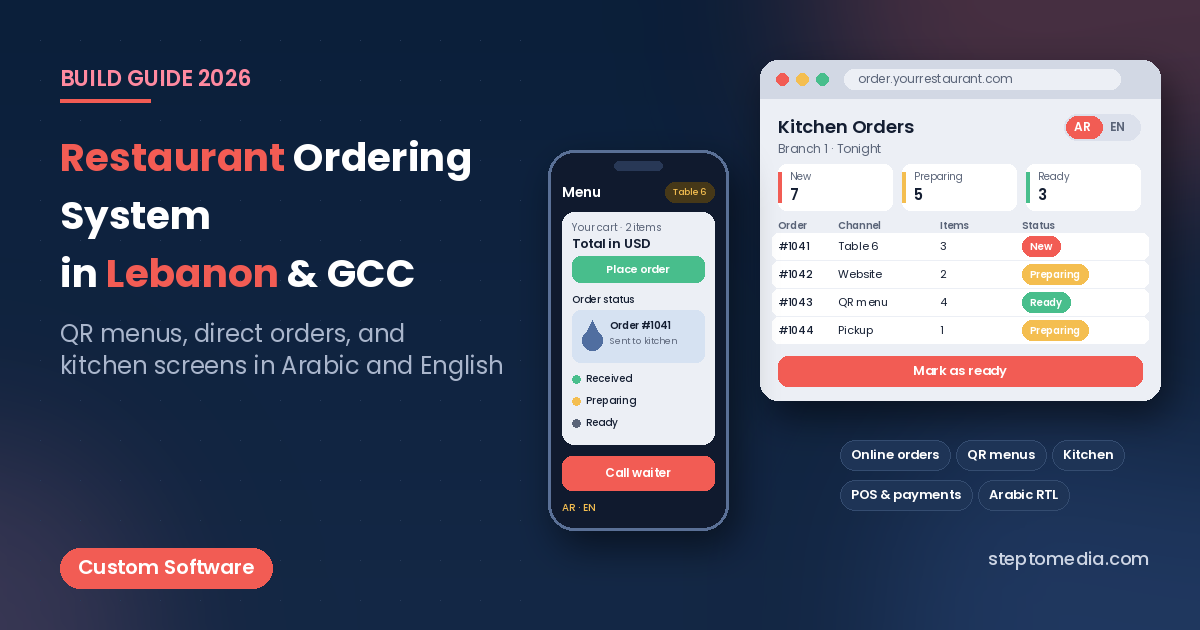
- QR menu and table ordering: a QR code on each table opens the menu, identifies the table and lets guests order or call a waiter.
- Kitchen display screen: new orders appear on a screen or printer by station (grill, cold, bar), with timers and “ready” buttons.
- Order status updates: customers see received, preparing, ready and out-for-delivery, by SMS, WhatsApp or in the browser.
- Admin dashboard: orders by channel, best-selling items, peak hours and cancelled orders, exportable for accounting.
- Branches and roles: separate menus, prices and hours per branch, with manager, cashier and kitchen permissions.
QR Menus and Dine-In Ordering
A QR menu can be as simple as a mobile-friendly menu page, or as complete as table ordering with payment at the table. The simple version is cheap to launch and easy to update when prices change. The full version needs table mapping, waiter call buttons, order merging for groups and a clear rule for when the bill is closed.
For most restaurants, a browser-based menu is enough. Guests do not want to install an app to see dinner options, which is why many teams build this part as a fast web app or a progressive web app rather than a store app.
Arabic and English Menus
Menus in Lebanon and the Gulf are usually bilingual. That means every item, modifier and category needs Arabic and English fields, a right-to-left layout that does not break on small phones, and fonts that read well for both scripts. Our guide to bilingual Arabic and English websites covers RTL details that also apply to menus and receipts.
Prices also need care. Restaurants in Lebanon often show USD prices and may still need LBP for some payments, while GCC restaurants work in local currencies and VAT-inclusive pricing. Decide early how prices, taxes and rounding are displayed, so the website, the receipt and the accounting export agree.
Payments, Cash on Delivery and POS Integration
Cash on delivery and cash at pickup remain common, so the system should treat cash as a normal payment method with clear reconciliation for drivers and cashiers. Card payments depend on which local banks and providers you can contract with; our payment gateway guide for Lebanon websites and apps explains the options and trade-offs.
The bigger question is the POS. If your restaurant already uses a POS, ask whether it has an API or a supported way to receive online orders. A direct link avoids staff retyping orders. When no API exists, a kitchen display and a daily export can still work. We cover these connections in our API integration guide for payments, ERP and WhatsApp, and specifically for messaging in WhatsApp and ERP integration.
Website, Mobile App or Both?
A restaurant ordering system usually begins on the web: an ordering website and QR menu reach every customer without an install. Through our website development services, this first phase can launch faster and be tested with real orders.
A dedicated app makes sense when you have frequent repeat customers, a loyalty program, several branches or a strong brand in the Gulf. Push notifications, saved addresses and reorder buttons can then justify the extra work. Our mobile app development team often recommends validating demand on the web first, as explained in web application vs mobile app: which first. If points and rewards are part of the plan, see our loyalty app development guide.
Ready-Made Platform or Custom Build?
Ready-made ordering platforms are quick to start and can suit a single café with a simple menu. They become limiting when you need Arabic RTL done properly, local payment methods, custom kitchen routing, branch-level pricing, or a direct POS connection the platform does not support.
A custom restaurant ordering system costs more upfront but gives you control over the data, the customer experience and future features. Our comparison of custom software vs SaaS walks through the decision, and our custom software development service covers builds that connect ordering, kitchen and back office.
Restaurant Ordering System: Cost and Timeline
We don’t quote fixed prices without a scope. Cost depends on the number of channels (website, QR, app), the depth of POS and payment integration, the number of branches and how much reporting you need. Our custom software development cost guide for Lebanon explains the main cost drivers, and the MVP guide shows how to launch a smaller first version.
A sensible phased plan looks like this:
- Phase 1: bilingual menu, online ordering for pickup and delivery, order dashboard and kitchen screen.
- Phase 2: QR table ordering, card payments, customer accounts and order status messages.
- Phase 3: POS integration, multi-branch management, loyalty and a mobile app if demand supports it.
After launch, plan for hosting, security updates and menu support. Our website and app maintenance guide explains what ongoing care usually includes.
How to Brief a Development Partner
Before you contact any team, write down how orders flow today: which channels you use, how many orders arrive at peak time, how the kitchen is organised, which POS you have and how drivers are paid. Add your menu structure, the languages you need and two or three ordering experiences you like. The custom software brief template gives a fuller checklist.
If you are comparing partners, our page on choosing a software and web development company in Lebanon lists what to check. When you’re ready, contact Step To Media to discuss your restaurant’s ordering workflow.
Frequently Asked Questions
What is a restaurant ordering system?
It is software that takes orders from your website, QR menu, app or staff, sends them to the kitchen, tracks their status and records payment, all from one dashboard.
Is a restaurant ordering system the same as a delivery app?
No. A delivery app usually connects many stores, customers and couriers. A restaurant ordering system belongs to one restaurant or group and focuses on its own menu, kitchen workflow and direct customers.
Do I need a mobile app for restaurant ordering?
Not at first. An ordering website and QR menu work in any browser. A mobile app makes more sense later, when you have many repeat customers, a loyalty program or several branches.
Can a restaurant ordering system work with my current POS?
It depends on the POS. If it offers an API or supported online order integration, orders can flow in directly. If not, a kitchen display screen and daily exports are a practical alternative.
Can the menu be in Arabic and English?
Yes. A well-built system stores Arabic and English names for every item and modifier, uses a proper right-to-left layout for Arabic, and shows the right language on screens and receipts.
No next post available