POS Software Development in Lebanon and the GCC: Retail, Restaurants and Multi-Branch Stores (2026)
POS Software Development in Lebanon and the GCC: Retail, Restaurants and Multi-Branch Stores (2026)
 25 Nov
POS Software Development in Lebanon and the GCC: Retail, Restaurants and Multi-Branch Stores (2026)
Supermarkets, pharmacies, clothing stores, cafés, mobile shops and hardware stores: every business that sells over a counter needs a checkout it can trust. POS software development is about more than ringing up sales. A good point of sale system tracks stock, prices, customers, staff and cash across every branch, and it keeps working when the internet or the power does not. This 2026 guide explains which features matter, what is specific to Lebanon and the GCC, and when it makes sense to build a custom POS instead of buying one.
Step To Media is a software development agency in Lebanon, based in Mkalles. We build web platforms, mobile apps and custom software for companies in Lebanon and the Gulf. Below is the checklist we would walk through with a retailer or a restaurant group planning a new POS.
Who Needs Custom POS Software?
Many small shops are well served by a ready-made POS. Custom development usually comes up for:
- Retail chains with several branches that need central pricing, stock transfers and branch-level reports.
- Supermarkets and mini-markets with large catalogs, barcode scales, promotions and fast checkout lanes.
- Restaurants and cafés that combine dine-in, takeaway and delivery orders with a kitchen display. If online ordering is the main need, see our guide to restaurant ordering system development.
- Pharmacies, electronics and spare-parts stores that track batches, expiry dates, serial numbers or IMEIs.
- Distributors and wholesalers that sell at the counter and in the field with different price lists per customer.
Core Features of a Modern POS System
Fast checkout
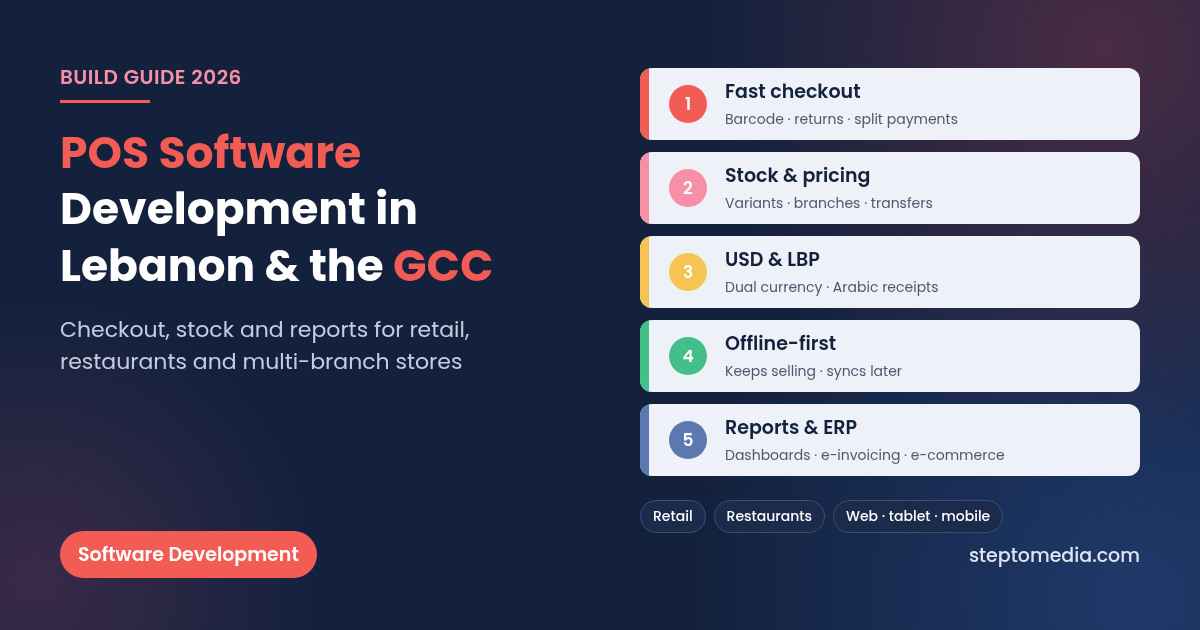
Barcode scanning, quick product search in Arabic and English, discounts, returns and exchanges, held orders and split payments. Cashiers should be able to finish a sale with as few taps as possible, on a touchscreen, a tablet or a regular PC.
Products, stock and pricing
Variants such as size and color, units and packs, cost and selling prices, low-stock alerts, purchase orders, stock counts and transfers between branches. For larger stock operations, a POS often connects to a warehouse management app.
Payments and cash management
Cash, cards, wallets and credit sales, with opening and closing balances per shift and a clear cash count at the end of the day. Card terminals and online payments depend on your bank and provider; our payment gateway guide for Lebanon covers the main options.
Customers and loyalty
Customer profiles, purchase history, credit limits, points and vouchers. A POS can feed a loyalty app so customers see their points on their phone.
Staff, roles and audit
Separate permissions for cashiers, supervisors and managers, approval for refunds and price changes, and a log of who did what. This protects the business and makes end-of-day checks faster.
Reports and dashboards
Sales by branch, product, category, cashier and hour, margins, slow-moving stock and tax summaries, available on the web and on the owner’s phone.
What Is Specific to Lebanon and the GCC
Dual currency in Lebanon
Many Lebanese businesses price in US dollars and also accept Lebanese pounds. A POS built for Lebanon should store a base currency, let a manager set the exchange rate, accept split payments in USD and LBP, give change in either currency and print both amounts on the receipt. Reports must stay consistent when the rate changes during the day.
Tax and e-invoicing in the Gulf
VAT applies in Saudi Arabia and the UAE, and Saudi Arabia’s tax authority ZATCA requires electronic invoicing (Fatoorah) for VAT-registered businesses, rolled out in phases. A POS used in the Kingdom must generate compliant invoices and, where required, integrate with ZATCA’s systems. Requirements change, so confirm them with the authority or your tax advisor before going live. In Lebanon, receipts and VAT reports should follow the rules your accountant applies.
Arabic and English everywhere
Product names, the cashier screen, receipts and reports should work in both languages, with proper right-to-left layout for Arabic. We explain the details in our article on bilingual Arabic and English websites, and the same rules apply to a POS.
Offline-first by design
Power cuts and unstable connections are a reality in Lebanon, and some GCC branches sit in malls or remote areas with weak coverage. An offline-first POS keeps a local database on each terminal, keeps selling without the internet, and syncs sales and stock to the central server when the connection returns.
Hardware and Integrations
POS software has to talk to hardware and to other systems. Plan for:
- Hardware: receipt printers, barcode scanners, cash drawers, customer displays, label printers and weighing scales.
- Accounting and ERP: daily sales, purchases and stock movements pushed to your accounting system or ERP. See ERP vs custom software to decide where each function should live.
- E-commerce: one catalog and one stock count for your shop and your e-commerce website, so online orders never sell items that are out of stock.
- Delivery and WhatsApp: order notifications, receipts or loyalty messages through WhatsApp and delivery apps, using official APIs. Our API integration guide covers this.
Ready-Made POS vs Custom POS Software
A ready-made POS is the right choice when your workflows are standard, you have one or two branches and you want to start this week. Custom POS software development is worth it when:
- Your pricing, promotions or branch rules do not fit packaged tools.
- You need dual-currency handling, Arabic receipts or local tax rules that the product does not support well.
- Monthly per-terminal fees across many branches add up over the years.
- You want to own your data and connect the POS freely to your ERP, e-commerce and apps.
A middle path also works: keep a packaged POS at the counter and build custom dashboards, a loyalty app or integrations around it. Our comparison of custom software vs SaaS goes deeper into this decision.
Web, Desktop or Mobile POS?
A web-based POS runs in the browser and is easy to update across branches. A desktop or tablet app gives deeper hardware access and stronger offline behavior. A mobile POS on Android or iPhone suits van sales, events and table-side ordering. Many systems combine a web back office with a tablet or desktop checkout and a mobile app for owners and field staff.
What Drives the Cost of POS Software
We do not publish fixed prices because every POS is different. The main cost drivers are the number of platforms (web, desktop, mobile), offline sync, multi-branch stock, hardware support, tax and e-invoicing integration, e-commerce and ERP sync, loyalty features and the number of languages and currencies. For a general view of market ranges, see our guide to custom software development cost in Lebanon, which uses public market data, not Step To Media’s official prices.
How We Build a POS System
- Discovery: visit the counter, map the checkout, stock and cash-closing process, and list the hardware.
- Scope and design: define the first version, screens for cashiers and managers, and the integrations.
- Development: back office, checkout app, offline sync and reports, delivered in short iterations.
- Testing in a real branch: pilot with real cashiers before rolling out to every location.
- Launch and support: training, data migration from the old system, and ongoing maintenance.
Learn more about our software and web development company in Lebanon, or see our website development service if your POS needs an online store alongside it.
Frequently Asked Questions
What is the difference between POS software and a cash register?
A cash register only records sales. POS software also manages products, stock, prices, customers, staff permissions, receipts and reports, and it can sync with an online store, an accounting system or an ERP.
Should we buy a ready-made POS or build custom POS software?
A ready-made POS is quicker and cheaper to start and fits standard shops. Custom POS software development makes sense when you need your own workflows, multi-branch rules, dual-currency handling, Arabic and English receipts, or integrations that packaged tools do not support. Some businesses keep a packaged POS and build a custom layer through its API.
Can a POS system handle USD and Lebanese pounds at the same time?
Yes, if it is designed for it. A POS built for Lebanon can store a base currency, apply a daily exchange rate set by the manager, accept split payments in both currencies and print the amounts on the receipt, while reports stay consistent.
Does POS software for Saudi Arabia need ZATCA e-invoicing?
Businesses subject to VAT in Saudi Arabia must issue electronic invoices under ZATCA’s e-invoicing (Fatoorah) rules, which are being applied in phases. A POS used there should generate compliant invoices and, where required, integrate with ZATCA. Check the current requirements with ZATCA or your tax advisor before launch.
Can the POS keep selling when the internet goes down?
Yes, if it is built offline-first. The terminal keeps a local database, records sales, and syncs them to the server when the connection returns, so a power cut or a weak connection does not stop the checkout.
How long does it take to build POS software?
It depends on scope. A focused first version with sales, products, stock, receipts and basic reports is usually planned in weeks to a few months. Multi-branch stock, loyalty, e-commerce sync and tax integrations add time. A written scope gives a reliable estimate.
Planning a POS for your shop, restaurant or chain in Lebanon or the GCC? Contact Step To Media and tell us how your counter works today.
No next post available